![]()
Equipment Introduction
Tag trackers are popular electronic products in recent years. Based on low-power Bluetooth transmission and UWB (a kind of close-range precise positioning technology), TAG is designed to facilitate the anti-loss tracking of personal items. At present, Apple, Huawei and other brands have launched their own TAG products, and many manufacturers in Shenzhen, China have also produced various types of Tag through "Apple Find My" certification, independent development of related APP, etc., to achieve positioning and searching functions.
The working principle of TAG trackers is to rely on the Bluetooth of nearby mobile phones as a relay to transmit location information to the servers of the same brand mobile phone manufacturers to achieve location tracking. TAG trackers have low power consumption and small size. The wireless signal time slots emitted by TAG in operation are irregular, and the
transmitted signal power is extremely weak, which is easy to cause missed detection by conventional detection methods. The SD-05 TAG Precision Locator can quickly identify micro TAG tracking devices (including but not limited to Apple AirTag locator and Huawei TAG locator) based on Bluetooth and UWB technology, and adopt professional signaling technology to extract TAG tracker communication feature codes. After discovering TAG devices, it can induce TAG terminals and SD-05 to continuously interact, quickly identify TAG trackers, and accurately lock the hidden location of TAG terminals.
Device Operation
I. Power On: Press the ON/OFF button at the bottom (the circular indicator light at the bottom will turn blue) and wait for the system to load the program. After approximately 40 seconds, the system will successfully boot and display the main interface.
Figure 1: System Interface
![Portable Precision Tag Signal Detection Locator SD-05]()
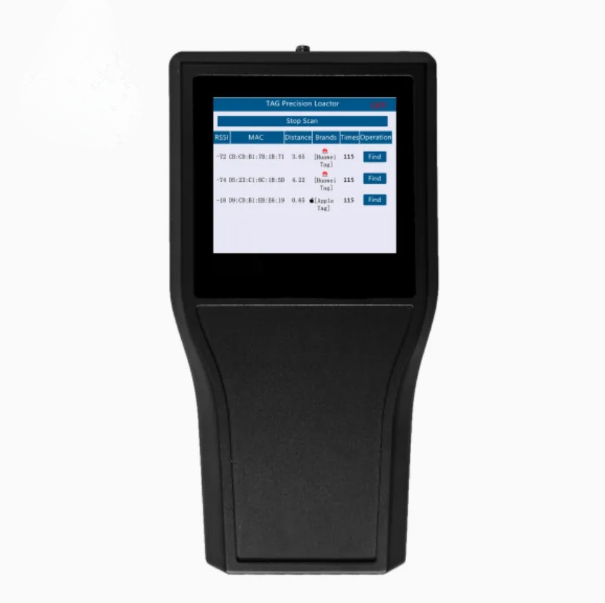
II. Search: After the system loads, click "Start Scan" and the system will automatically search for nearby TAG terminals. The search process will be completed within 3 minutes. Once a TAG
terminal is detected in the current environment, the system will display information such as the RSSI, MAC address, distance (estimated), manufacturer, and the number of interactions of the
nearby TAG terminal.
Figure 2: Search Interface
![Portable Precision Tag Signal Detection Locator SD-05]()
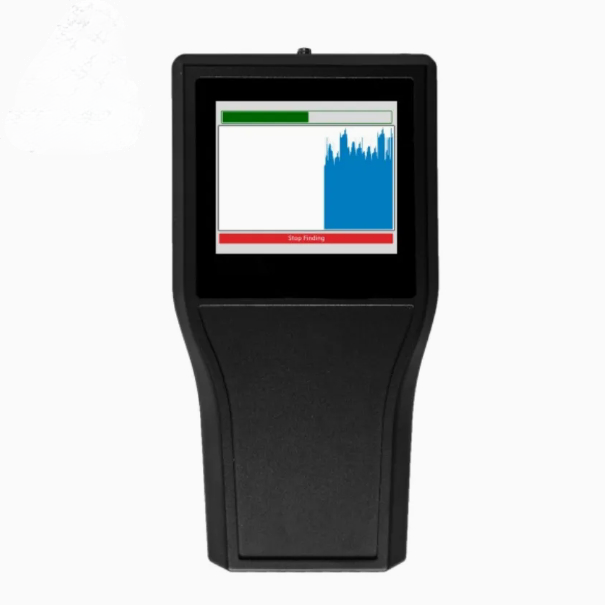
III. Accurate Positioning: After searching for the TAG terminal, you can click "Find" to accurately locate the currently selected TAG terminal.
During the accurate positioning process, slowly move the device and observe the green indicator bar at the top of the positioning interface and the changing blue field strength curve in the middle of the positioning interface to search. During the search process, the device will continuously emit warning sounds to indicate that you are getting closer to the locked TAG terminal.
Figure 3: Positioning Interface
IV. Shutdown: After ending the search, click the red OFF button in the upper right corner of the system interface to close the software program. Then press the ON/OFF button at the bottom (the circular indicator light next to the bottom switch will turn off) to execute the shutdown
procedure. (Please strictly follow the above shutdown procedure.)
V. Charging: When the charger is inserted, the red LED light next to the charging port at the bottom will light up to indicate that it is charging. When the red charging indicator light goes off, it indicates that the charging is complete.
![]()